
In Gujarat, many government recruitment applications are submitted through the OJAS (Online Job Application System) website.
While filling out these forms, candidates are required to enter their personal and educational details and upload important files such as their photograph and signature.
This is where a very common problem begins:
How do you resize a photo or signature to the exact dimensions and file size required by the recruitment form?
The Problem We Heard from Students
While building PDFRoot, we spoke with several students preparing for competitive examinations and government jobs.
We asked them about the difficulties they face while filling out online recruitment forms.
One problem came up repeatedly:
Resizing a photograph and signature to the required KB size.
Many candidates use photographs taken with a smartphone or camera. These files are usually much larger than the file size accepted by government recruitment portals.
Candidates may also need to meet specific image dimensions at the same time.
For someone who is not familiar with image editing, compression, dimensions or KB limits, what looks like a simple task can quickly become frustrating.
One example from the OJAS application system clearly shows why this becomes difficult for many candidates. The portal requires applicants to prepare their photograph and signature within specific dimensions while also keeping the file size within a maximum limit of 15 KB.
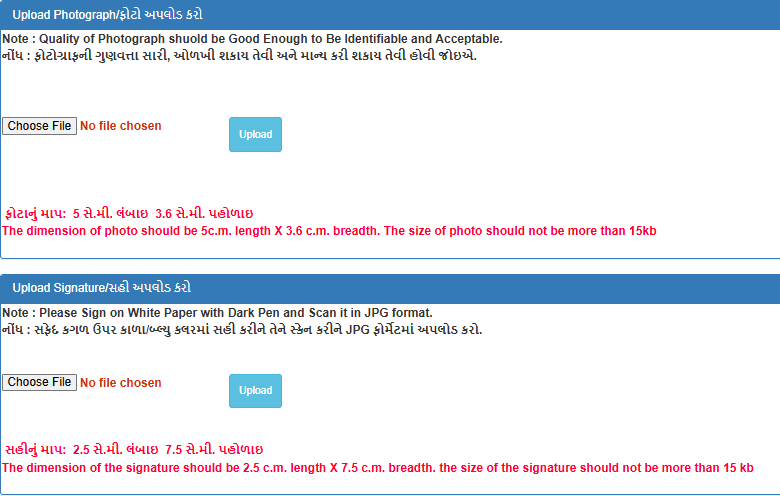
For users who are unfamiliar with image dimensions, compression and KB limits, meeting all of these requirements at the same time can be confusing. This is exactly the type of problem PDFRoot was created to simplify.
This Problem Inspired PDFRoot
We realized that this was not a problem faced by just one or two students.
Many candidates preparing for government jobs were struggling with the same issue while filling out OJAS and other recruitment forms.
That is why we decided to create simple tools on PDFRoot.com that could make this process easier.
One of those tools is the OJAS Photo Resize Tool.
What Is the OJAS Photo Resize Tool?
The purpose of the OJAS Photo Resize Tool is simple:
Upload your photo, adjust it according to the recruitment requirements, and prepare it for submission without using complicated photo-editing software.
With PDFRoot, users can easily:
- Resize a photo
- Crop a photo with Crop Image
- Reduce image file size in KB with Resize Image to Exact KB
- Resize a signature with Signature Resize
- Compress images for recruitment forms with Compress Image
- Prepare photos for government job applications
The goal is to make the process simple enough for anyone to use, even without technical or photo-editing knowledge.
No Technical Knowledge Required
A candidate should not have to learn professional photo-editing software just to submit a government recruitment form.
That was one of the main ideas behind PDFRoot.
Users can select their photo from a mobile phone or computer, make the required adjustments and prepare the image in just a few steps.
Today, people use PDFRoot tools such as the OJAS Photo Resize Tool to make their recruitment application process easier.
Seeing users successfully complete their work with these tools is one of the biggest reasons we continue improving PDFRoot.
PDFRoot Is Built to Solve Real Problems
PDFRoot is not only about creating common tools such as PDF Merge, PDF Compress or PDF Convert.
Our goal is also to solve small but important problems faced by students, government job applicants, cyber cafe operators and everyday users.
The OJAS Photo Resize Tool is one such example.
It was created after understanding a real problem faced by candidates preparing for competitive examinations and government recruitment.
We will continue building useful tools that make it easier to prepare photographs, signatures, PDFs and documents for online applications.
Need to Prepare Your Photo for OJAS?
Use PDFRoot to resize, crop and compress your photo or signature for online recruitment forms.
Resize OJAS PhotoPDFRoot.com — A simple way to prepare Photos, PDFs and Documents for Government Forms.
Note: Photo size, signature size, dimensions, format and KB limits may vary from one recruitment notification to another. Always check the official recruitment instructions before preparing and uploading your files.
Back to blog